Scheduled Automations
Project Synapse can turn a published workflow into a recurring automation without changing the workflow itself. A schedule answers when an approved, versioned workflow should begin; the workflow still decides what happens, which approvals are required, and which connectors may be used.
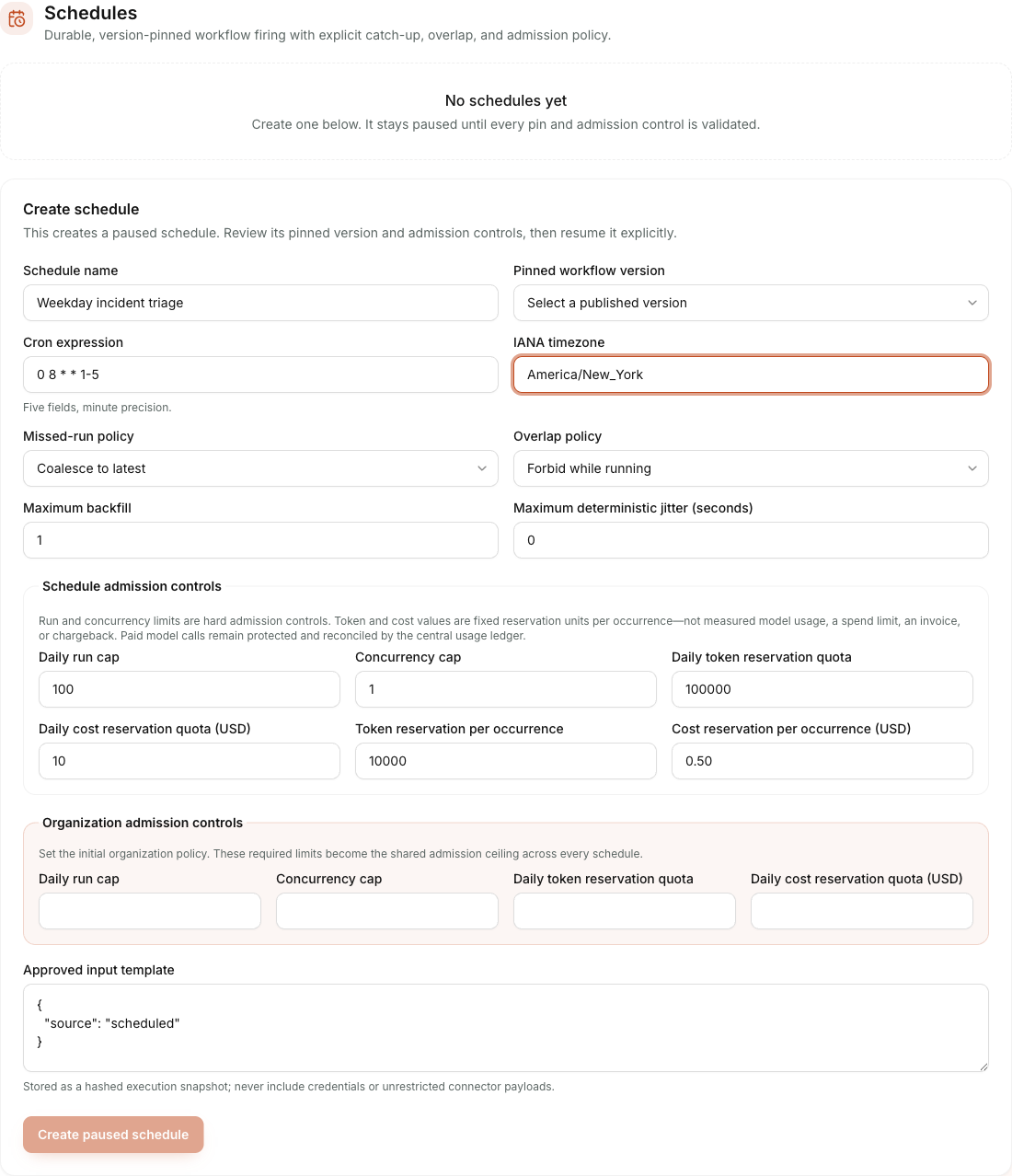
Creating a schedule — cron expression, IANA timezone, missed-run and overlap policy, and admission-control quotas.
What a business administrator chooses
Every enabled schedule records an exact, reviewable configuration:
- the published workflow version to run;
- a familiar cron schedule and an IANA timezone such as
America/New_York; - what to do when the platform was unavailable at a planned time: skip, coalesce the missed window into one run, or backfill a bounded number;
- whether a new occurrence may overlap an earlier run;
- approved input values for the workflow; and
- explicit hard daily-run and concurrency limits plus fixed token and USD-denominated admission reservations.
The scheduler's token and cost values are admission reservation quotas. A configured amount is reserved for each accepted occurrence before it enters the durable queue. They do not measure model tokens, settle provider charges, cap actual spend, create an invoice, or provide departmental chargeback. Paid model operations remain protected and reconciled by Project Synapse's central usage ledger. Budget hierarchies have shipped: each paid request must fit under every organization, cost-center, user, agent or workflow budget that applies, as Spend showback & budgets describes. Schedule-scoped actual-usage reconciliation is not built.
Publishing a newer workflow does not silently change an existing schedule. An administrator must review and explicitly re-pin the schedule. Editing a schedule's meaning also disables it until the revised configuration is reviewed and enabled again.
When an administrator submits a new schedule, the browser keeps a bounded, hash-only request receipt until the server confirms the schedule ID. The schedule configuration itself is not stored in that receipt. If a response is lost or the page reloads, submitting the same configuration reuses the original request ID instead of creating a second schedule. Confirming one request never clears another request that is still pending.
What happens at the scheduled time
- An external clock asks Project Synapse to perform one scheduler tick.
- Project Synapse claims due schedules in Postgres and records the intended local time, timezone, UTC offset, and actual enqueue time.
- It creates one durable workflow run for each accepted logical occurrence and advances the schedule cursor in the same database transaction.
- A separate worker executes the queued workflow. The scheduler never calls a model or connector itself.
- Existing workflow rules still apply, including human approval before a consequential external write.
Duplicate scheduler deliveries are safe. The durable occurrence key combines the schedule and intended UTC fire time, so a retry finds the same logical run instead of creating another one.
Missed times, overlaps, and limits
- Coalesce is the normal catch-up choice: it creates one run representing a bounded missed window.
- Skip records an audited omission and advances to the next future time.
- Backfill creates the oldest missed occurrences first, up to an approved maximum. It is useful for mandatory reports but should have tight admission controls.
- Forbid overlap defers a new occurrence while an earlier one is active. Allowing or replacing work is possible only within explicit concurrency and pre-effect safety rules.
- A run, concurrency, or reservation-quota denial defers the occurrence; it does not consume the cursor or silently lose the planned run.
What the audit record shows
Schedule history shows the intended and actual time, timezone evidence, catch-up and overlap decisions, cursor movement, deduplication outcome, and the created workflow run ID. It deliberately excludes raw workflow input, model payloads, connector responses, credentials, and lease tokens.
Public demo boundary
The Vercel demo is a web-only control plane. It can display and administer schedules, but Vercel does not run the persistent worker or the one-minute scheduler process for this project. Automatic firing requires an external job runner plus the durable worker runtime. The enterprise target uses one Azure Container Apps Job as the clock and independently scaled Container Apps workers; local operators can invoke the same one-tick command for verification.
This boundary is deliberate: a page request is not a reliable enterprise clock, and schedule correctness must not depend on whether someone has the browser open.