How Agents Learn Your Formats
A question that comes up in almost every demo: "How does it get trained on our FDS format?" The honest answer is that today it isn't trained on anything — and that's actually the reassuring part, not a gap.
An agent is not a trained model
Under the hood, a Project Synapse agent is three pieces of configuration, not a model that's been retrained:
- A job description — written instructions telling it how to approach the task and what standard to hold itself to.
- A structured input form — the specific questions it asks before it starts (which module, what the requirement is, what kind of object, and so on).
- A defined output format — the exact sections its answer must contain, in order.
Changing any of that is an administrative edit, not a software project. An administrator opens the agent's settings, changes the instructions or the output sections, and the change is live on the very next run — no release, no deployment, no waiting on an engineering team.
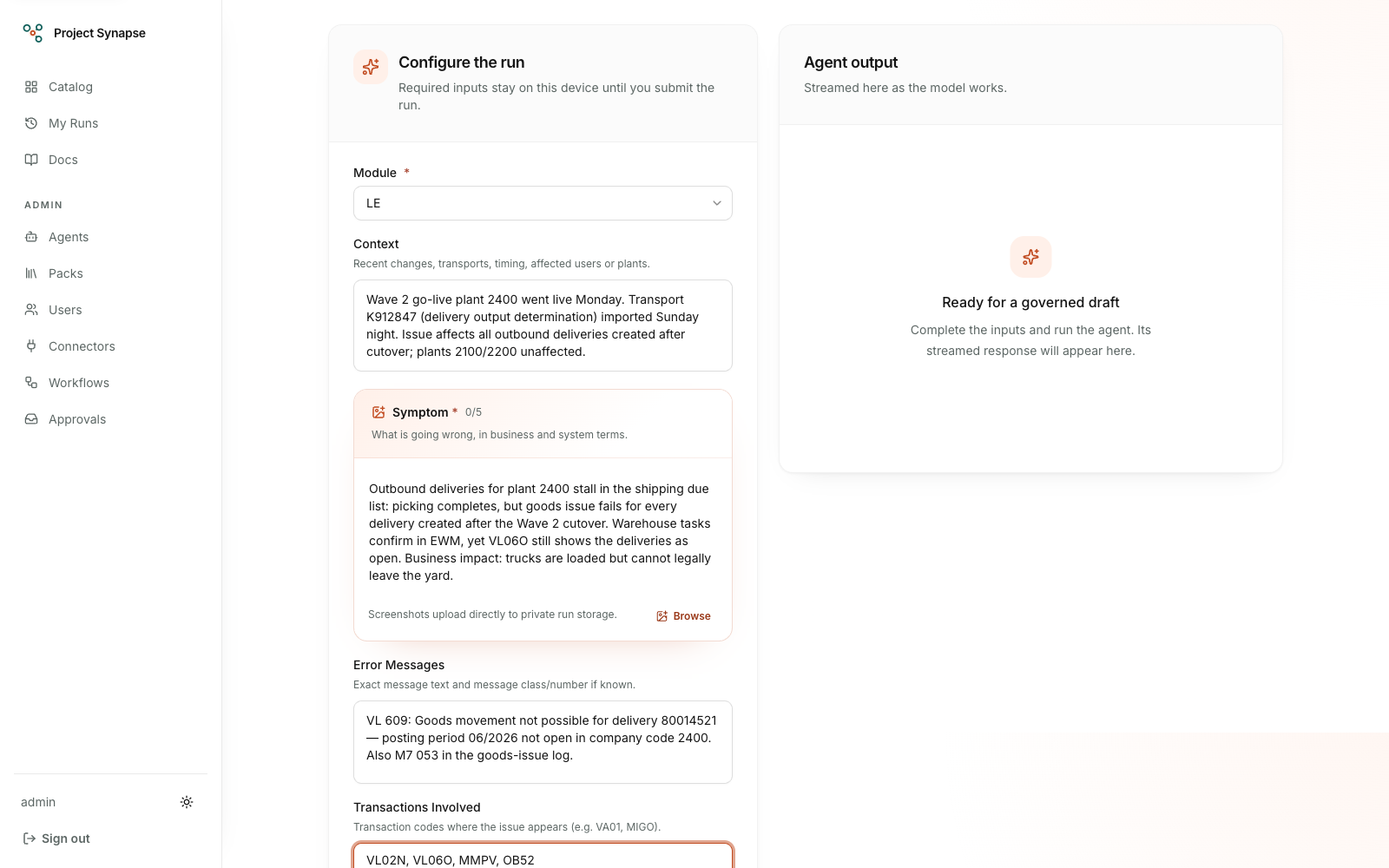
The structured input form — a module selector plus a composer narrative filled with an LE goods-issue case and an ordered evidence block.
Teaching it your format
Instructions alone don't carry a 40-page template. For that, Project Synapse uses knowledge packs: a folder of reference documents — a template, a style guide, worked examples — that you upload once and then grant to a specific agent. Before that agent drafts anything, it automatically pulls the passages of your uploaded material that are relevant to the current request and follows them.
A concrete example already built into the product: the Functional Spec Writer agent ships with a starter knowledge pack containing a generic SAP specification template. If your organization has its own FDS format — different section order, different terminology, a mandatory sign-off block — you upload it as a knowledge pack, grant it to the Functional Spec Writer, and every spec it drafts from that point on follows your structure instead of the generic starter. Update the uploaded document later, and the change takes effect on the very next run — teaching it a new format is the same act as updating a document.
There's also a lighter-weight option for a one-off case: the FDS Reviewer agent has an optional field on its form where you can paste your organization's review checklist for that single run, without setting up a knowledge pack at all. A knowledge pack is the right tool when a standard applies every time; a pasted note is fine when it's a one-time ask.
Knowledge pack documents can also carry diagrams. Four of the seeded demo packs embed a synthetic diagram served from the app itself, and the agents granted those packs are instructed to repeat a relevant image line from the retrieved passage unchanged, so their answers can show that diagram. No model in the platform generates images; an agent only shows a diagram that is already in its retrieved knowledge.
Generic vs. private — a hard boundary
Knowledge packs come in two kinds. Generic packs are reusable reference material — starter templates, general guidance — meant to be shared. Company packs are your organization's own, private material. This isn't just a label in a menu: it's enforced at the platform level. An agent only ever draws from the packs it has been explicitly granted, and a company pack is never visible to anyone outside the organization that owns it. Your FDS format can't leak into someone else's agent.
Every consultation is on the record
Whenever an agent draws on a knowledge pack, Project Synapse records exactly which bounded passages were issued to the model as numbered references for that output. The owner/admin run record lists each one under Sources with its document, pack and passage number, and shows the passage itself: the text that was issued to the model for that run, displayed as plain text. Anyone who may see the run sees those passages. The roles that may read pack documents (PlatformAdmin, AgentBuilder and Auditor) see an Open document link on each source of any run they may see. For PlatformAdmin it opens the whole document and its original file; for AgentBuilder and Auditor it does not open the document yet. In the support chat, a person can also open a document that their own answer cited, from that answer's source page. Other roles see the passage. If a draft looks off, you can check whether the agent received the reference material you expected without claiming that every issued passage influenced the answer.
Choose how strictly an agent must use knowledge
Each agent has one of three grounding modes, pinned into the version that runs:
- Open lets relevant knowledge help, but does not require a citation. This preserves the familiar behavior for general-purpose agents.
- Preferred asks the agent to use the supplied passages and cite their numbered references. If suitable knowledge is missing, the run may continue, but its permanent record shows that warning.
- Required is the strictest choice. If no passage clears the relevance threshold, the run stops before model generation rather than inventing an answer. A generated answer must also include a citation that was actually issued for that run before it can be recorded as successful.
The run record shows the mode, whether acceptable context was found, the grounding outcome, any knowledge-index warning, and the retrieval generation. That summary card does not display passages or detected attack text; the passages issued as references appear under each source, as described above.
Refinement is deterministic by default: it reuses the original retrieval generation, so an auditor can reproduce what changed in the answer without also changing its evidence. Select Refresh governed knowledge only when the new instruction needs newly indexed material or a new search. That creates the next retrieval generation and leaves the earlier one intact.
This citation check is deliberately narrow and explainable. It verifies that the answer cites a reference the platform supplied; it does not claim that a model has semantically interpreted every cited sentence correctly.
Getting better over time — today vs. what's coming
Today, "teaching" an agent means the two things above: configuring its instructions and giving it reference material through knowledge packs. That's real, and it's live now. True model training is on the roadmap, not shipped yet — worth being precise about the difference:
- Planned, always-on: every time a reviewer corrects an agent's draft before accepting it, Project Synapse will keep that correction. A nightly automated check will replay the accumulated corrections against the current agent to catch drift before it shows up in real work — so quality improves from actual use, not just manual prompt-tuning.
- Planned, optional, and only for organizations running models on their own hardware: a fine-tuning pipeline that trains the model itself on an organization's own accumulated corrections. It ships pre-built and switched off; a team in a fully self-hosted setup can turn it on, and no correction data ever leaves their environment.
Both of those are committed roadmap items, not something you can switch on in a demo today. What you can do today — and what actually solves "how do I get it to write specs the way we do" — is the knowledge pack.