Meet the Agents
The repository seed defines thirty agents: twenty-seven specialist agents and
three fleet-demo agents (Fleet Demo Planner, Fleet Demo Item Worker and Fleet
Demo Reducer) that power the seeded fleet-demo-fanout parallel workflow and
carry no tool grants. A hosted catalog reflects its last administrator-approved
seed run; deploying code does not add catalog rows. Below is what each
specialist is for, in roughly the order they come up in a typical workday — not
alphabetically.
Ten agents hold a grant to one of the four generic packs whose document
embeds a diagram: Delivery-Block Triage Analyst and Issue Analyzer
(sap-sd-delivery-operations, and for Issue Analyzer also
ams-service-model), Three-Way Match Discrepancy Analyst
(sap-procure-to-pay-reference, next to its company pack), Incident Classifier,
Client Comms Drafter, Incident Triage, Support Escalation Brief and Change
Handover Brief (ams-service-model), Transport Risk Reviewer
(sap-transport-management), and Operations Knowledge Assistant
(ams-service-model and sap-transport-management). Each of those four pack
documents embeds a synthetic diagram served from the app's own /knowledge/
path. Agents can show diagrams from their knowledge packs: when a retrieved
passage contains a relevant image line, the agent's instructions tell it to
repeat that line unchanged, so the answer can display the diagram. No model in
the platform generates images, and an agent only shows a diagram when
retrieval returned the passage that contains it.
The seed also carries a synthetic operations corpus: 55 documents in four
packs, described in the knowledge packs guide. Issue
Analyzer and Incident Root-Cause Brief are granted the incident digests
(company-ams-incident-digests) and the runbooks (sap-operations-runbooks).
Delivery-Block Triage Analyst is granted the runbooks. Client Comms Drafter
and Transport Risk Reviewer are granted the change and downtime calendar
(company-change-and-downtime-calendar). FDS Reviewer, FDS Compliance Checker
and Functional Spec Writer are granted the specifications
(company-solution-design-fds). Operations Knowledge Assistant is granted all
four. Incident Resolver is granted the incident digests, the runbooks and the
change and downtime calendar. Support Assistant is granted the incident digests
and the runbooks. None of these documents embeds a diagram.
Each agent's grounding mode is part of its catalog definition, next to its
grants. Ten agents are seeded in preferred mode: Issue Analyzer, Incident
Root-Cause Brief, Client Comms Drafter, Delivery-Block Triage Analyst,
Three-Way Match Discrepancy Analyst, Transport Risk Reviewer, Functional Spec
Writer, Operations Knowledge Assistant, Incident Resolver and Support
Assistant. In that mode the
agent is asked to cite the passage that supports a claim by its marker, such
as [1],
and a run still completes, marked "Completed with a warning" under Sources on
the run record, when no acceptable passage was retrieved. Every other seeded
agent runs in open mode, which asks for no citations. Re-running the seed
returns a seeded agent to its catalog mode.
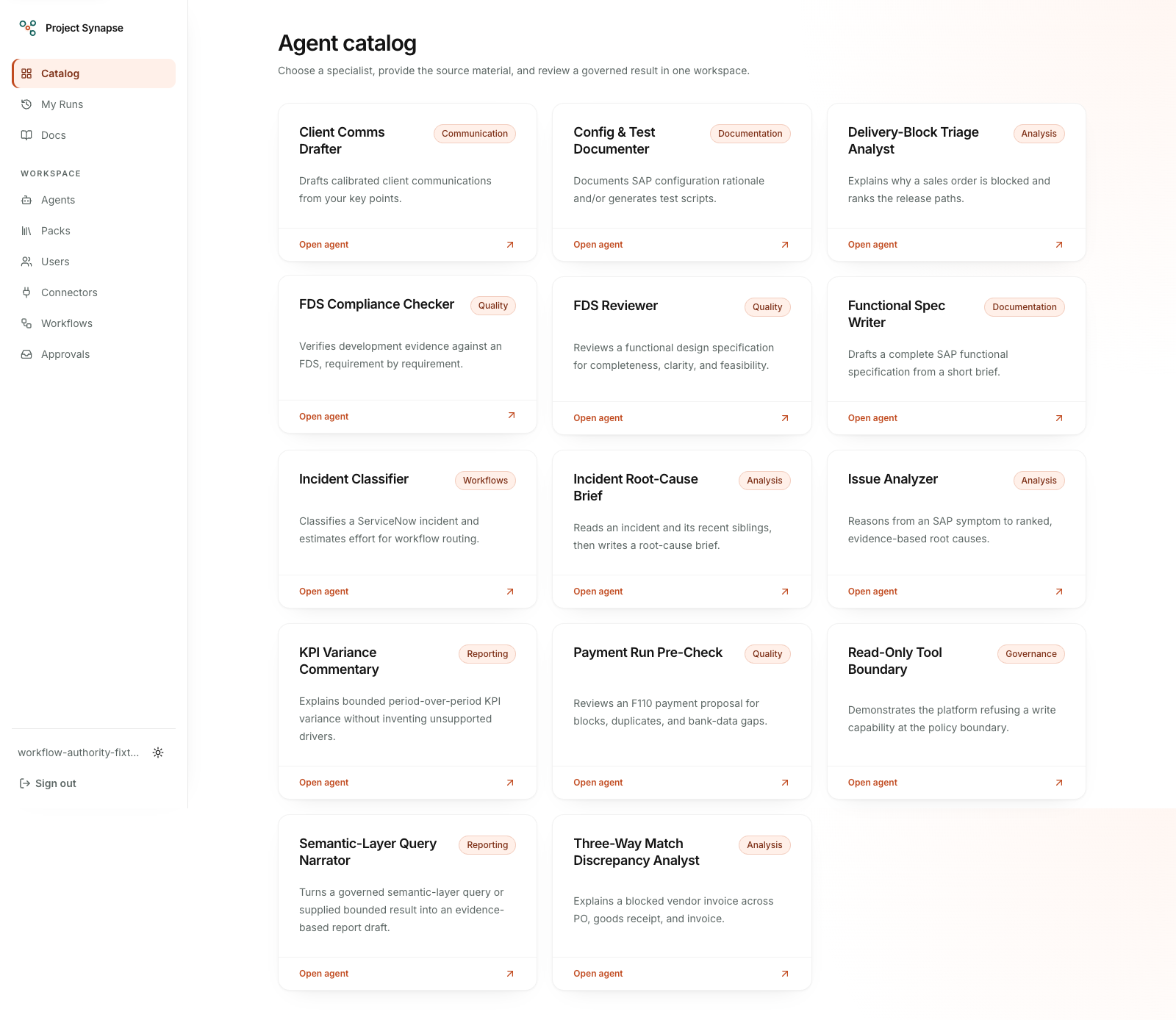
Earlier fourteen-agent catalog, before the master-data pack. Each card is a specialist agent defined as data; the three master-data definitions are described below.
How the catalog is organized
The signed-in catalog is a directory grouped by SAP value stream: Order to
Cash, Procure to Pay, Record to Report, Master Data Governance, Build &
Release, Run & Support (AMS), and Platform & Governance. Each section lists its
agents as compact rows: a stream-colored monogram, the agent's name, a one-line
description, and badges. On a wide screen a rail on the left lists the value
streams with counts; on a phone the same list is a scrollable row of chips
under the search field. Choosing a stream filters the directory and puts it in
the address, such as /?stream=order-to-cash, so a filtered view can be shared
as a link. The search field narrows by name and description. Agents an
administrator adds under any other category appear in an "Other" section after
the value streams. The nine workflow step agents (Incident Classifier, the five
incident autopilot agents and the three fleet-demo agents) sit last in a
collapsed "Workflow step agents" group, because they run inside workflows
rather than on their own.
Each row shows how many knowledge packs the agent is granted, with their names on hover, and a "Live system" badge when it holds a read-only connector capability. An agent's page repeats this in a "What this agent uses" strip: its knowledge packs by name, and each read-only live system in plain words, such as "S/4HANA entity read". Platform administrators also get a link from each pack to its admin page, where every document title opens a read-only viewer showing the stored original with its diagrams. Write-tier grants and system prompts are never shown. Agents that ask for an SAP area now offer a Process area choice: Order to Cash (SD), Procure to Pay (MM), Plan to Produce (PP/QM), Warehouse & Logistics (EWM/WM/LE), Record to Report (FI/CO), Master Data (MDG), or Cross-process.
Workstream scope for builders
An administrator can limit where a builder works. Each value stream above is a workstream, and a platform administrator can put builders into groups on the Access page, where each group names the workstreams its members may author in. A builder in a group can create, edit, publish and test agents only in those workstreams: the Workstream choice on the agent form offers only their streams, Manage Agents lists only their agents, and a save outside their streams is refused by the database, not just hidden on the page. A builder who is in no group is not limited, which keeps the behavior from before groups existed, and the Access page marks such a builder as "Unscoped: all workstreams". Removing a builder from their last group makes them an Operator, so they do not fall back to authoring everywhere. None of this changes who can run an agent: anyone who may run agents can still run any active agent in any workstream.
Test an agent before publishing
The protected Studio on each Manage Agents record lets a PlatformAdmin or
AgentBuilder compare the published version with an immutable draft or
testing candidate, then run that exact candidate without publishing it. A new
draft starts as an inactive agent with no published pointer. Later saves append
new versions; they do not rewrite an earlier candidate or move the published
pointer. The published version remains the ordinary execution authority, and
candidates never enter ordinary runs or published workflows.
Studio shows the latest 50 candidates and compares the system prompt, input schema, output template, model, grounding mode, knowledge grants, and tool grants side by side. JSON and grants are shown in stable order. Long previews are visibly truncated at 32 KiB; the underlying immutable version is unchanged. The run form uses the selected version's schema and accepts the same bounded input, attachments, and evidence as a regular run. Inputs and attachments remain untrusted content and receive no connector, tool, or model authority from being included in a test.
Normal provider policy is the default. An eligible real-model test is fully metered, reserved, rate-limited, and capped just like a regular run. Force mock can only narrow provider selection to the existing mock path: it cannot give a mock-only user real-model access, expand tool authority, or bypass a budget. There is no separate test budget. The selected version and immutable run flags remain pinned across execution, retry, refinement, cancellation, and recovery; provider selection is re-derived from those flags and the current normal policy whenever execution resumes.
Run history can be filtered by All, Regular, or Test. Every test run keeps a permanent Test label, the candidate lifecycle state, and whether Force mock was used; Markdown, Word, and JSON exports preserve the test provenance. Studio does not publish, promote, schedule, or run a workflow, and it adds no connector writes. It is not the isolated code-execution sandbox from Task 4.6. There is no public playground: review, approval, production promotion, rollback, and retirement remain separate future work.
Issue Analyzer
Reasons from a reported problem to a ranked list of likely root causes, the way an experienced consultant would triage a live incident — sorting its thinking into configuration, master data, and code, and naming exactly where to look to confirm each candidate cause.
You give it the process area, what's going wrong, any error text, and relevant background; you get back ranked causes with reasoning, the evidence still needed, and suggested next steps. Use it when a ticket lands and you want a prioritized checklist before you start digging, instead of starting cold. Adapting it: its instructions already ground it in standard transactions per module; grant it a knowledge pack of your own known-issues history if you want its suggestions grounded in your past incidents specifically.
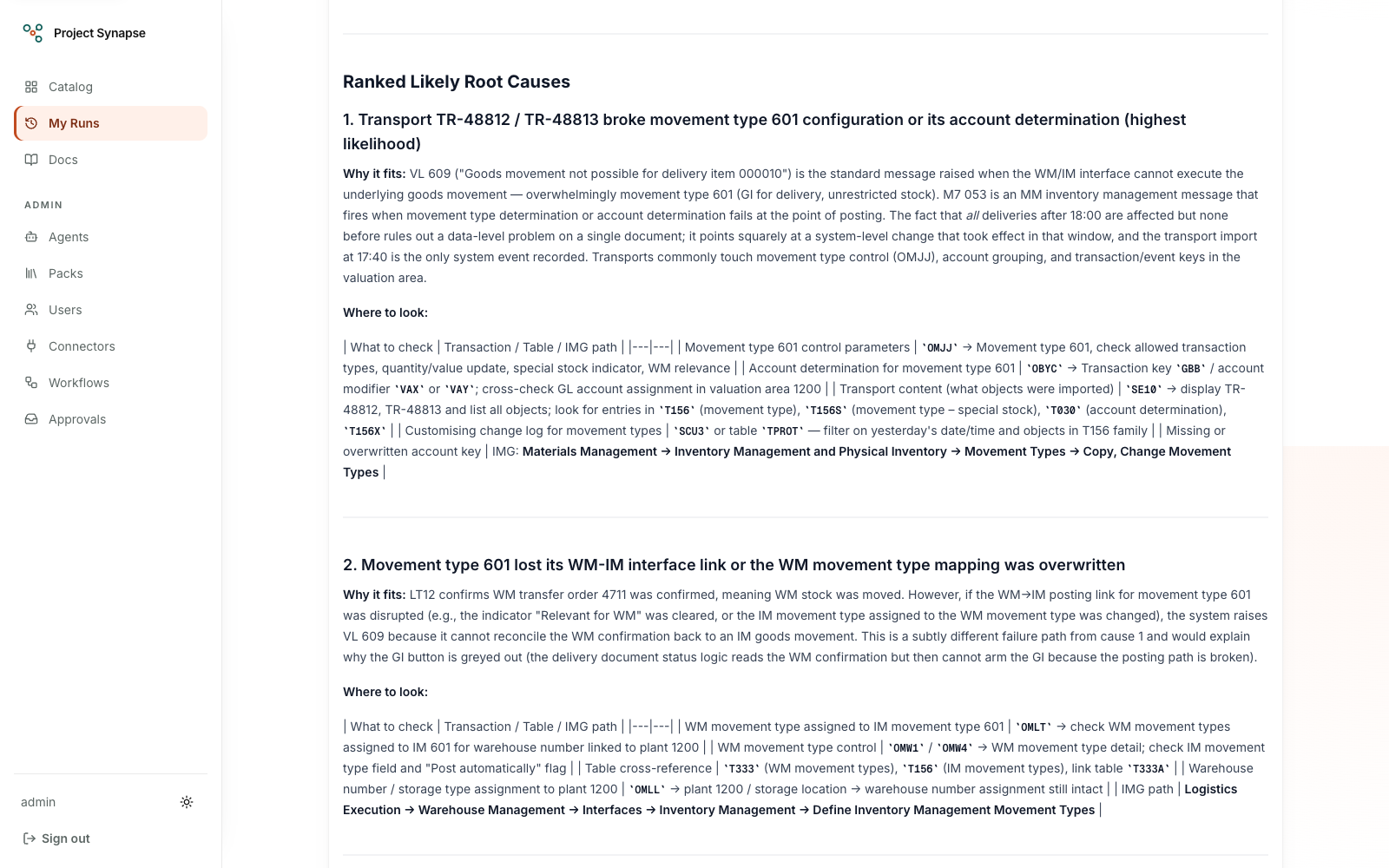
The Issue Analyzer's ranked root-cause output from a real LE goods-issue analysis, sorted into configuration, master data, and code with the evidence still needed.
Operations Knowledge Assistant
Answers one operations question in a few sentences. It is instructed to end each factual sentence with the marker of the passage it rests on. It reads past incident digests, problem records, runbooks, specifications and the change and downtime calendar. When a past incident is the source, it is instructed to name the incident, the country and the date.
You give it a question, written with the terms you would search for: the job,
the message, the IDoc status, the transaction code or the transport. It is
instructed to answer in at most 250 words, in three parts: the answer, what
fixed it, and the titles of the sources used. When the retrieved passages do
not answer the question, it is instructed to say so and stop. It is
instructed not to evaluate or compare people or teams, and it holds no
tools. Use it when you want to know whether something has happened
before and what fixed it, before you open a longer analysis. What it
shows on the demo: it is
granted six packs of synthetic content that describes no real organization.
Four are the operations packs (company-ams-incident-digests,
company-solution-design-fds, company-change-and-downtime-calendar and
sap-operations-runbooks), and two are ams-service-model and
sap-transport-management. The three company packs are reachable only
through an explicit grant like this one. On the mock model the text is a
placeholder, as it is for every agent.
Screenshot Reader and Support Assistant
These two agents answer one turn of the support chat, which has its own
screen at /chat (Chat in the top bar); see
Support chat.
Screenshot Reader reads one SAP screenshot that a user attaches to a chat message and writes a fixed list of fields: the message text, the message class and number (such as M7 053), the message type, the transaction, the program or job, the screen title, the company code or plant, the country, the system and client, and how readable the screenshot was. It is instructed to read only what is visible, to omit personal names, user IDs and email addresses, and to write none for a field it cannot read. Before the reading is used, the platform checks each field against a fixed format or length limit and drops a field that fails, and it does not use a reading that looks like an instruction. The reader holds no knowledge pack and no tools, and runs in open mode.
Support Assistant answers the chat message. It receives the message, the
checked reading of this turn's screenshot or of an earlier one, up to three
earlier exchanges of the conversation as untrusted reference data, and the
audience. For a business audience it is instructed to use plain words and at
most five steps; for an analyst, to name transactions, programs, jobs and
tables, to tie each step to a runbook, and to label causes as hypotheses. Only
the message and the reading go into its knowledge search. It is granted
company-ams-incident-digests and sap-operations-runbooks, holds the
read-only incidents.lookup and incidents.search capabilities and the
engine:consult_advisor grant, and runs in preferred mode. It is instructed to search open incidents only and to call a
matching open incident possibly already reported, never a duplicate; the
open-only search is an instruction to the model, not a platform guarantee. It
answers SAP support questions; it replies to a greeting or a general question
about the user's company, SAP or IT in one to three sentences, and politely
declines anything else, such as unrelated coding, advice on health, law or
money, or creative writing. These limits are instructions to the model, not a
platform filter. A new problem gets an answer in five parts: what's going on,
seen before, already reported, steps, and what to do if it still fails. A
follow-up is answered directly, building on the earlier answer instead of
repeating it, and a vague message gets one clarifying question.
For a real-model answer, the person's Answer mode choice sets the tier: Auto and Fast run on the economy tier, Balanced on standard and Thorough on frontier; a large input or more than two screenshots can still raise it. The advisor grant lets the assistant ask an advisor model one tier above its own answer for a second opinion: it is instructed to ask before it answers a diagnosis or a request to change a production system, and again when the evidence does not add up, within the deployment's consult cap. A person can rate each real answer, and each source an answer cites opens on its own page. On the mock model the text is a placeholder, as it is for every agent.
Functional Spec Writer
Drafts a complete functional specification from a short brief — a title, process area, and a paragraph of requirements become a structured first draft covering business requirement, as-is/to-be process, detailed design, assumptions, dependencies, and open points.
You give it a title, process area, object type, and the requirements; you get back a full draft, ready to correct rather than write from scratch. Use it when kicking off a new development request. Adapting it: it ships with a starter specification template attached — replace it with your own organization's template via a knowledge pack (see "How agents learn your formats") to match your exact format.
FDS Reviewer
Reviews a functional design specification before it reaches a build team — checking completeness, hunting for ambiguous or contradictory wording (quoting the exact text and suggesting a fix), flagging requirements that can't be tested as written, and flagging technical risk grounded in how the named module behaves.
You give it the process area, the specification text, and a review focus (full, completeness, testability, or feasibility); you get back a verdict, findings, ambiguities with suggested rewrites, and a ranked top-five summary. Use it when a spec is about to go to development and you want the gaps caught first. Adapting it: paste your own review checklist into the form for a single run, or add standing rules to its instructions if it should apply every time.
FDS Compliance Checker
Independently verifies delivered development — code, configuration, or test results — against a specification, requirement by requirement, never marking something satisfied without pointing at the evidence.
You give it the process area, the specification, the development evidence, and what kind of evidence it is; you get back a full traceability matrix (requirement → status → evidence cited), deviations, undocumented extras, and what's still unproven. Use it when sign-off is due at go-live and you want an evidence-backed answer, not a guess. Adapting it: it works from whatever evidence you paste in each run, so adapting it is mostly about the evidence you feed it.
Config & Test Documenter
Turns a consultant's configuration notes into finished deliverables: audit-ready configuration rationale (each setting, where to find it, and why) and step-by-step test scripts a tester could run unassisted.
You give it the process area, the configuration description, the business purpose, and which deliverable you want; you get back that deliverable, formatted for a project's workbook and test log. Use it when a configuration change is just agreed, so documentation and test cases get written up together. Adapting it: extend its instructions with your organization's own documentation or test-case conventions.
Client Comms Drafter
Drafts a written communication — a status report, meeting summary, follow-up email, or escalation note — from the key points you give it, calibrated to audience and tone.
You give it the comm type, audience, key points, and tone; you get back a subject, a drafted body, and an "open items" list for anything it didn't have enough information to include — it never invents a fact. Use it when it's end-of-period, or right after a tense call, and you want a calibrated first draft. Adapting it: mostly through the audience/tone choices per run; add standing house style to its instructions if you have one.
Incident Classifier
Reads a ServiceNow incident's short description and classifies it — incident (a fix within the current design) or change (a new requirement) — and estimates the effort in hours, with a confidence score.
You give it the incident's short description and number; you get back a
structured result only (category, hours, rationale, confidence) — no
free-form write-up, because it feeds directly into automated routing.
Use it when this is the agent quietly triaging every incoming
ticket inside Project Synapse's seeded support workflow, so a person only
sees the ones needing a decision. Unlike the rest of the catalog, it's built
to run as a workflow step, not to be opened and run on its own. Adapting it:
the rule acting on its output — like the five-hour escalation threshold —
lives in the workflow, not the agent, so a workflow admin can adjust it
without touching the agent. Its instructions and its ams-service-model
grant state the same rule so the estimate and rationale are made against it.
In the seeded ams-incident-classification workflow, the rule node checks the
classifier's output in this order:
- Confidence below 0.7 goes to a low-confidence review gate.
- An estimate above 5 hours goes to an approval gate. After approval, an Azure DevOps work item is created and the incident is annotated. A rejection ends the run without a handover.
- Anything else, an estimate of 5 hours or less, is AMS work. The workflow
proposes the ServiceNow work note "Handled as an AMS incident (estimate 5
hours or less)." and ends with the outcome
ams.
Every ServiceNow and Azure DevOps write in this workflow waits for approval in the action inbox before it runs. The seeded connector instances are credential-free stubs, so their receipts are not evidence of an external write. Workflow runs need a worker and stay pending on the web-only Vercel deployment.
The AMS incident autopilot
The repository seeds ams-incident-autopilot as a published, webhook-triggered
workflow with five step agents: Incident Triage, Incident Resolver, Support
Escalation Brief, Change Handover Brief and Change Link Note. Like Incident
Classifier, they are built to run as workflow steps and return a structured
result only.
- Each ServiceNow delivery starts one run, and Incident Triage classifies the ticket: its stream, its incident type, support case or change, its severity and a two-sentence summary.
- When two agent replies were already posted, the ticket goes to the escalation step, where the assignment to a support group is proposed and waits for an approval; otherwise a triage confidence below 0.7 goes to an Approver, who confirms or corrects the classification.
- For a support case, Incident Resolver works from the retrieved incident digests, runbooks and change calendar only, and each claim in its reply carries a one-line quotation, the source title, its country or plant, and the passage marker.
- A reply with a match strength of at least 0.7 and a non-empty text is
proposed as a requester-visible comment (
incidents.comment), and when the requester's latest message says the fix worked, the workflow proposes to resolve the incident (incidents.update). - Anything else, including a weak match or an empty reply, is escalated:
Support Escalation Brief picks AMS Integration, AMS Logistics, AMS Finance
or AMS Basis and writes the work note, and the workflow proposes the
assignment (
incidents.assign). - A change is handed over instead: Change Handover Brief drafts the handover
as plain text (a title, a description, how it works today, what the
requester wants instead and the business justification), and the workflow
proposes an Azure DevOps work item (
workitems.create). The work item carries the texts after the title as paragraphs and lists (the title is sent as it is), and the incident's number as plain text. Then the workflow proposes a ServiceNow change request that names the work item (changes.create), Change Link Note writes the work note, and the next action adds that note to the incident and sets its two ticket fields, the related change and the work item (incidents.annotate). The last action writes the change request's number onto the work item (workitems.update).
Every outbound action is an approval. Every action is a connector action,
and a connector action always waits in the action inbox: the connector is
called only after an authenticated decision, so nothing is written to
ServiceNow or Azure DevOps without one. The graph marks the comment, the
assignment, the change request, the link and the work item's back-reference
auto, and the resolution and the work item gated. That marking records
intent only. No engine code reads it, and every action still waits for its
approval. A rejection, at the triage review or at any action, ends the run
with the outcome declined.
On the change path a person approves the work item, the step the graph marks
gated. Three separate actions follow it, each with its own approval, and
the graph marks all three auto: the change request, the link (the work note
with the two ticket fields) and the work item's back-reference (the change
request's number, written onto the work item). The back-reference is the
fourth action of the path and comes after the link. A rejection at the work
item ends the run before a change request is proposed. After a rejection at
the change request, the work item that a person approved stays as it is, with
no change request and nothing written to the incident. After a rejection at
the back-reference, the work item, the change request and the linked incident
stay as they are, and the work item carries no change number. In the brief,
anything assumed or missing is marked [TO CONFIRM].
The change path writes to seven fields that this example expects on the
customer's systems. Their names are configuration of the workflow: they stand
in its graph (src/lib/workflows/incident-autopilot-example.ts), and no
connector holds one.
- On the ServiceNow incident:
u_related_change, which takes the change request's number, andu_ado_work_item, which takes the work item's id. The change request is givenu_ado_work_itemtoo. - On the Azure DevOps work item:
Custom.AsIs,Custom.ToBeandCustom.BusinessJustification, beside the stockSystem.Description, and two single-line text fields:Custom.IncidentNumber, which takes the incident's number, andCustom.ChangeNumber, which takes the change request's number. Azure DevOps does not distinguish letter case in a reference name.
The autopilot does not run on the hosted demo. Workflow runs need a worker, so
a delivery stays pending on the web-only Vercel deployment. The seeded
servicenow-dev and azure-devops-dev instances are credential-free stubs,
so a real conversation needs live connectors. It also needs a real model
route: on the mock provider the resolver step's placeholder output does not
pass the step's schema.
A delivery always starts a new run, and a workflow cannot read a connector, so the sender supplies the history in the webhook payload:
- Send
event_id, unique for each delivery. A delivery that repeats anevent_idstarts no second run. - Send
number,short_description,description,category,service,country,conversation_textandlatest_messageas strings. Every one of these keys must be present: a missing key fails the step that reads it. numbermust not be blank.incidents.commentandincidents.assignrefuse a blank number, and they do so only after the approval decision, when the connector is called.- The other text fields may be empty strings, and
conversation_textis empty for a new incident. - Write
conversation_textas the comment history, oldest first, one line for each entry, beginningrequester:oragent:. - Send
agent_reply_count, the number of agent replies already posted, as a number. A missing count, or a count sent as a string, fails the routing step. priority,stateandopened_atbelong to the payload, but no step reads them.- Send no person field: no caller, assignee or opened-by key, and no name, email address or phone number.
Transport Risk Reviewer
Reviews a transport request before it is imported, usually from QAS into production, and rates its risk as Low, Medium, or High with the drivers behind that rating.
You give it the transport ID and a description of the change, and optionally
the object list and the target system; you get back the risk rating,
dependencies and import sequence, the objects of concern, test
recommendations, and a go/no-go with its rationale and conditions. Use it
when a transport is queued for the next change window and the CAB wants a
written position. It has no connector tools and reads no system: it works only
from what you supply and from the granted sap-transport-management pack, and
its instructions forbid claiming to have inspected a real system, transport, or
log. Anything it could not verify is marked [TO CONFIRM].
Material Master Dedupe Candidate Finder
Ranks possible duplicate materials from a bounded extract or attached evidence. Give it a review request, source record IDs, descriptions, units, and the scope you have. It drafts a change request for human approval, showing both matching and conflicting fields. Similar names are only candidates; a steward must confirm equivalence and any proposed remediation. No records are merged or changed in SAP.
Business Partner Validation & Change-Request Draft
Reviews supplied completeness evidence and drafts a change request for human approval. Give it the requested review and a small synthetic or de-identified extract. Its findings separate observed values, proposed corrections, missing evidence, and human verification steps. It never invents an identifier or treats a missing verification as a passed check.
Field-Level Governance Rule Explainer
Explains the applicable retrieved field rules, their scope, source, and required
human review. Give it a rule question and optionally the entity type, field,
extract, and organizational context. It distinguishes the synthetic company
rules from general explanation and marks unsupported statements [TO CONFIRM].
All three agents have an explicit grant to the synthetic
company-master-data-governance pack and no connector tools. Other agents gain
no access to that pack. If retrieval supplies no applicable rules, the draft
must state that limitation. Use synthetic or de-identified evidence while the
Classification Gateway and broader sensitive-data protections remain gated.
These are published agents producing business drafts; the word “draft” does
not mean they are unpublished Studio candidates. Normal model policy and
metering apply. Mock output demonstrates the flow and is not a completed
master-data analysis.
Master-data draft review workflow
The repository seeds master-data-change-request as a published manual workflow.
In an approved worker-enabled environment, a PlatformAdmin can start it with:
{
  "change_request": "Draft a completeness review for SYN-BP-001",
  "bounded_extract": "SYN-BP-001: organization name Example Demo; country missing",
  "incident_number": "INC0010001"
}
Supply all three keys. The draft agent receives the request and extract; the incident number comes from the operator's input. Publication pins the agent version. An Approver reviews the draft and its basis first. After that approval, the existing action inbox requires a separate approval of the proposed incident annotation. Rejection at either checkpoint ends without annotation. Existing author/approver separation applies. An authorized action reviewer can use the existing Override control to replace the proposed incident and note; that replacement is itself the reviewed, immutable action payload.
The only action is incidents.annotate on the exact servicenow-dev instance.
It adds work notes to an existing incident, not a ServiceNow change record.
The seeded instance is a credential-free stub, so its receipt is not evidence
of an external write. Nothing changes SAP master data. A live connector requires
separate configuration and approval outside this example.
Workflow runs need a worker and remain pending on web-only Vercel; standalone draft agents can run inline. Workflow agent steps receive no connector tools and persist structured JSON containing the draft, basis, caveats, follow-ups, rationale, and confidence. The workflow does not automatically create or deliver DOCX files. No webhook or active schedule is seeded for this workflow. The catalog image above remains an explicitly labeled earlier snapshot.
Delivery-Block Triage Analyst
Explains why a sales order is stuck — credit, delivery, billing, or simply incomplete — and then ranks the ways out, saying for each one who can authorize it, what it actually changes, and whether the block will come straight back.
You give it the process area, which block was reported, the order situation, and
the order number; you get back the diagnosis, ranked release paths, and the
evidence still needed. Use it when a customer is waiting and you need
the fastest path that also holds. What it shows on the demo: it is
granted the read-only odata.getEntity capability on the S/4HANA connector,
so the run record's "Tool activity" section shows the bounded tool loop for
real — the tool requested, the policy decision, and the result. The tool
inputs and results themselves are not retained: the platform deliberately
keeps the decision trail, not the payloads. That connector is a canned demo
stub, not a live SAP system, so the order it reads back is sample data.
Three-Way Match Discrepancy Analyst
Works a blocked vendor invoice across the purchase order, the goods receipt, and the invoice — dimension by dimension on price, quantity, date, currency, and unit of measure — then proposes the resolution path and its effect on the GR/IR balance.
You give it the process area, the reported block reason, the discrepancy (attaching
the invoice as evidence), and the document numbers; you get back the match
comparison, the diagnosis, a recommended resolution, and the alternatives.
Use it when an invoice is blocked and nobody agrees on why. What it
shows on the demo: this is the one agent granted the seeded
company-procurement-policy pack, so its runs cite company thresholds and
source-list rules that no other agent can reach — the tenancy boundary,
visible.
Payment Run Pre-Check
Reviews an F110 payment proposal before it is released: items that must not pay, likely duplicates, missing or invalid bank data, and cash discounts about to be lost.
You give it the run type, the proposal lines, the run scope, and any known concerns; you get back a release recommendation — release, release with exclusions, or hold — with every finding ranked by exposure and by whether it is reversible after release. Use it when the proposal is ready and somebody has to sign it off. Adapting it: it works from the extract you paste or attach each run.
Incident Root-Cause Brief
Reads an incident and its recent siblings, then writes the brief that goes to the customer and the resolver group at once — a plain-language summary for one, ranked hypotheses and exact SAP-side checks for the other.
You give it the process area, the incident number, and what was reported; you get
back the brief, with each hypothesis tied to the check that would confirm or
eliminate it. Use it when a ticket needs a written position rather than
another guess. What it shows on the demo: it holds the read-only
incidents.lookup and incidents.search capabilities, so the run record's
"Tool activity" section shows the tool loop end to end. The seeded ServiceNow
connector is a demo stub returning canned incidents, not a live instance.
On the demo site that connector instance has since been given live
credentials for a ServiceNow developer instance; a fresh seed still creates
the stub.
If the incident cannot be found — the number is not an incident number, no incident has it, or ServiceNow does not answer — the agent does not write a brief. It answers with a short note that says so, shows each lookup it tried, and asks for the correct number, or suggests trying again later.
On a live ServiceNow instance: a search can set state to open, which
returns only active incidents, or to any, the default, which returns all of
them. The search text is cleaned of ServiceNow query operators and limited to
200 characters before it is sent, and text with nothing left after cleaning is
refused. Search results show each incident's assignment group and no
assignee. A lookup takes only an incident number in the strict format INC
followed by 7 to 12 digits, such as INC0012345, and its result shows both
the assignee and the assignment group.
Semantic-Layer Query Narrator
Turns a governed dataset, a bounded SQL result, or a supplied bounded result
into an evidence-based report draft. It states the dataset and query basis,
separates observed values from interpretation, treats connector and extract
content as untrusted reference data, and marks every unsupported claim
[TO CONFIRM].
You give it a report request and may add a dataset, one read-only SQL statement,
a context path, a bounded result, and an audience; you get back a report, its
data basis, observed findings, caveats, and follow-ups. What it shows on the
demo: its datasets.list, datasets.get, and sql.query tools resolve only
to the deterministic dremio-dev stub under mock inference. Live enterprise
data activation remains gated.
KPI Variance Commentary
Explains a bounded current-versus-comparison KPI extract without turning an
unsupported hypothesis into a business driver. It shows the observed values
first, labels interpretation separately, cites the dataset/query basis, treats
connector and extract content as untrusted reference data, and marks gaps
[TO CONFIRM].
You give it the analysis request and may add the periods, dataset, SQL, and a
bounded extract; you get back concise variance commentary, the data basis,
caveats, and follow-ups. Its datasets.get and sql.query grants are also
stub/mock-only in this slice.
The published scheduled-report-drafter workflow uses the narrator in a
schedule-trigger → pinned agent → end graph. Workflow agent steps currently
receive no connector tools and persist structured JSON, so the workflow drafts
from supplied bounded data; it does not perform scheduled Dremio querying and
does not automatically create or deliver DOCX files. The seed creates no active
schedule. An administrator may configure one only in an approved worker-enabled
environment; the hosted Vercel demo has no worker or scheduler process.
Read-Only Tool Boundary
Not a working agent — a governance demonstration. It is deliberately granted
a write capability, incidents.update, so you can watch the platform refuse
it.
You ask it to change something in the connected incident system; the run
stops. The platform strips the write capability before the model is handed
any tool list, records the attempt as denied for the capability reason, and
ends the run with the stop reason denied_capability. The run record's "Tool
activity" section shows exactly that — the capability requested, the denial
and its reason, and the line "Stopped: a write-tier capability was denied" —
so the refusal is a record you can point at, not a claim. Use it when
somebody asks the question every security reviewer asks first — "can this
thing write to my systems?" — and you would rather show than assert. The
refusal is enforced by the engine, not by the agent's instructions, so it
holds identically on every model and every route.
Figure Describer
A helper for knowledge packs rather than a day-to-day assistant. Given one figure from a pack document, it writes a short, factual description of what the figure shows, with its labels and values, in at most 150 words of plain prose and with no speculation. Use it through the "Describe images" button on a pack document's page, which runs it once per figure and writes each description into the document, so the figure becomes searchable text; the Describing images section of the knowledge packs guide explains who can use it and what it costs. It holds no knowledge grants and no tools, and like any agent it can also be run from the catalog.