What Is Project Synapse
Project Synapse is a governed framework for running enterprise work on agents. It is an internal technical prototype, not a commercial product. The short version: your enterprise workflows, running on agents you can actually control.
The problem
Getting real value from AI inside an enterprise is not a model problem. The model is the easy part. What enterprise work actually needs is everything around the model: the context an agent should reason over, the tools it may touch, the coordination to carry a task across more than one system, the control that keeps a person in charge of anything consequential, and the evidence to show afterward exactly what happened and why.
A lot of delivery work is skilled but repetitive — reading a requirement and drafting the same kind of specification, triaging a ticket and re-typing its details into a second system, checking a document against the same list every time. None of that is hard; it is just slow, and it consumes the hours of skilled people who should be spending their attention on the calls that genuinely need judgment. Project Synapse exists to take the obvious first pass off their plate without handing the systems of record to an autonomous black box.
This is run-phase work — operating, supporting, and evolving the systems a business already depends on. Unlike a migration or transformation program, it has no end date: the tickets, specifications, and reviews continue every week. Project Synapse is built for that operational layer.
What Project Synapse actually is
Project Synapse is a small number of primitives working together.
A catalog of specialist agents (agents-as-data). An agent is not a general-purpose chatbot. It is a narrow specialist defined as data — a system prompt, a structured input schema, and an output template — configured to do one job well: draft a functional spec, review one for gaps, classify a support ticket, draft a status update. A person fills in a short, structured form and the agent returns a finished draft in the expected format, ready for review. The demo ships with a seeded catalog of these agents.
Knowledge packs give an agent your formats and reference material without retraining anything. Generic packs are reusable starter material; company packs are private to the organization that owns them, reachable only through explicit grants — a hard tenancy boundary, not a label. Agents are configuration, not training: adapting one to your organization means editing data and granting packs, never training a model on your content.
Connectors let agents reach systems like ServiceNow and Azure DevOps to look things up. Write capabilities are never handed to an agent as a tool.
Workflows chain agents and deterministic steps across systems, with a person in the loop. A single agent run is useful; a workflow is more useful still, because it connects an agent's recommendation to what happens next — in a different system — while guaranteeing a person signs off before anything real changes.
Governance and evidence run through all of it: every real change waits for a named approver, credentials are encrypted and never echoed back, and every run records what went in, what came out, and which reference passages it drew on — and, for real model calls, what it cost, labeled as estimated, reconciled, or unknown.
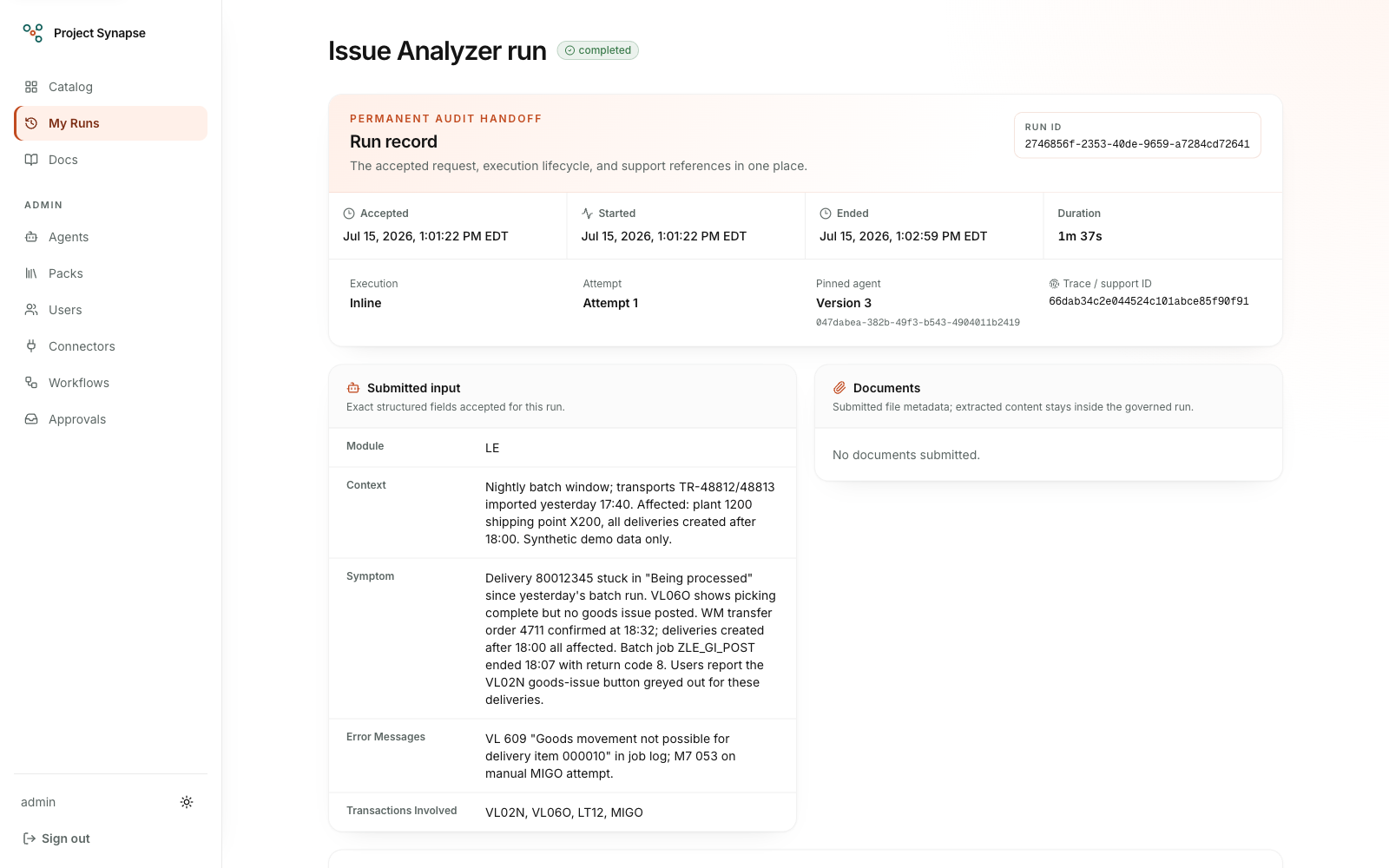
The permanent run record — lifecycle timestamps, the pinned agent version, and a support trace ID for every run.
A walk-through: a support incident, start to finish
Here is the configured reference workflow the demo ships with, modeled on a common application-support process. The demo runs on synthetic data. To be precise about what runs where today: in the hosted demo you can exercise the agents directly (standalone runs execute in-request), while the cross-system steps below queue durably but stay pending — the hosted environment runs no workflow worker, and of its connector instances only ServiceNow is live, while Azure DevOps is still a stub. The full sequence executes end-to-end in a local environment with the inline worker enabled, and it becomes operational in hosted production once the durable worker from the roadmap is deployed.
- A support incident lands in ServiceNow, exactly as it normally would.
- The workflow picks it up and hands the short description to a classifier agent, which recommends two things: is this a routine incident fix or does it look more like a change request, and roughly how many hours it will take.
- If the estimated effort crosses a threshold the team has set (five hours in the shipped example), the recommendation is not acted on by itself. It lands in a named person's approvals inbox, showing the recommendation, the reasoning behind it, and how confident the agent was.
- That person reviews it and approves it — or edits it first, or rejects it.
- Only after approval does anything real happen: the workflow creates the matching work item in Azure DevOps and leaves a note on the original ServiceNow incident explaining what was done — with no one retyping details from one screen into another.
If the agent is not confident in its own read of the ticket, it is not auto-routed at all; it goes straight to a human review queue. The system is built to ask for help rather than guess.
Project Synapse also has a support chat (Chat in the top bar). You describe an SAP problem in your own words or add a screenshot, and the Support Assistant answers from past incidents and runbooks, listing each step it takes while it works. People with real model answers choose how careful an answer should be; for them, the assistant can ask a stronger advisor model for a second opinion on hard questions, and each real answer can be rated helpful or not. See Support chat.
What Project Synapse is not
- It is not a do-everything chatbot. Every agent has a defined job, a defined input form, and a defined output. The support chat is the one place to type freely, and its assistant is instructed to answer SAP support questions and decline the rest.
- It does not act on real systems by itself. Nothing is created, updated, or closed in ServiceNow, Azure DevOps, or SAP without a person approving it first — that is built into how the platform routes requests, not a setting someone could quietly switch off.
- It is not trying to replace the people doing this work. It takes the obvious, repetitive first pass off their plate — the spec skeleton, the ticket triage, the checklist review — so people spend their attention on the decisions that actually need a person to make them.
- It is not a transformation or migration tool. Modernization programs end; the operational work they leave behind does not. Project Synapse targets the everyday layer — triage, specifications, reviews, and governed cross-system writes — that continues long after any migration is complete, on infrastructure the organization can host itself.
Integrations — today and planned
Two systems have live adapters today: ServiceNow (incident lookup, search, update, annotation, requester comments, group assignment, change request creation, and incident creation for the support chat's Raise a ticket) and Azure DevOps (work-item lookup, search, creation, comments, and updates). Going live is a configuration decision, not a code change — the hosted demo runs the ServiceNow adapter live against a ServiceNow developer instance and the Azure DevOps adapter in stub mode. An SAP S/4HANA OData adapter exists as a scaffold: its capability shape (entity reads and queries) is defined, and wiring it to live OData services is the next integration step.
Dremio (REST v3, read-only stub; live activation gated) is also present. Its deterministic catalog and bounded query results support the two Reporting agents without network access or credentials. The unit-tested live client is not wired into the registered adapter: enterprise-data activation remains blocked until the Classification Gateway and deterministic sensitive-data and credential protections are delivered and separately reviewed.
The planned wave extends the pattern, not the trust model: read-only data-plane connectors first (Snowflake, SQL Server, governed generic REST), then the application estate (Salesforce, HubSpot, Jira and Confluence, GitHub with abapGit for ABAP-aware checks, and Microsoft Graph for Teams, Outlook, and SharePoint). Every future system inherits the same rules as the first two: named capabilities with risk tiers, read-only tools for models, and writes that wait for a human approval.
Where it runs today
This is a prototype under active development. Standalone agent runs execute in the demo today, and the durable worker runtime is implemented for the target Azure topology. Hosted inference has four guarded real-model routes for explicitly approved demo users; other users remain on the deterministic mock provider. Every model attempt records durable usage evidence, and the run page labels the exact model plus estimated, reconciled, or unknown direct cost. See Model & cost controls, the roadmap, and the platform overview for the exact current, deployed, and planned state.